Concept: AI supported form
This case explores how AI can be integrated as a supportive layer in complex form-based workflows.
The focus is on improving clarity and data quality while maintaining user control, accessibility, and predictable interaction patterns.
AI is used to assist understanding and validation — not to make decisions.
My role:
Problem formulation | UX research | Interaction design | Accessibility architecture
Overview
Data shows that many people find instructions and language difficult to understand when filling in their details, and that one in five Swedes find e-services complicated. Forms are one of the areas where there are still widespread accessibility issues.
Among the difficulties are a lack of support and confirmation, especially among senior users who often feel unsure whether they have done the right thing, due to a lack of feedback in the form. In many cases, the form lacks labels, which also makes it difficult for screen readers.
Among the difficulties are a lack of support and confirmation, especially among senior users who often feel unsure whether they have done the right thing, due to a lack of feedback in the form. In many cases, the form lacks labels, which also makes it difficult for screen readers.
Approach and methodology
To address this problem, I formulated a hypothesis to investigate how they could be improved. To understand the scope and context of the problem, I analyzed national statistics and guidelines from established actors such as the Internet Foundation and the Agency for Digital Government.
The hypothesis concerned structural patterns in digital use, accessibility, and interaction with e-services. In this context, representative secondary data was more relevant than a limited number of my own interviews.
The project was in a conceptual and exploratory phase. The goal was to formulate a sustainable design strategy rather than optimize an existing detailed solution. Therefore, priority was given to a combination of:
The hypothesis concerned structural patterns in digital use, accessibility, and interaction with e-services. In this context, representative secondary data was more relevant than a limited number of my own interviews.
The project was in a conceptual and exploratory phase. The goal was to formulate a sustainable design strategy rather than optimize an existing detailed solution. Therefore, priority was given to a combination of:
- National statistics
- Established guidelines (e.g., WCAG)
- Documented user behaviors
- Heuristic analysis of existing solutions
This ensured that design decisions were based on verified and scalable needs rather than anecdotal insights.
Hypothesis:
“Context-sensitive, optional AI guidance can reduce uncertainty, improve response quality, and lower the abandonment rate while maintaining user control.”
Optional, transparent AI guidance
I explored how AI could be used in an advisory capacity rather than allowing AI to formulate text for the user. So instead of “Generate text,” I looked at a toggle-based AI guidance panel that the user actively opens. This reinforces the user’s sense of control.
I focused heavily on having visible focus states and clear contrast ratios. It was important to keep the AI guidance clearly separate from the official form content to create transparency about what is AI. I also added a clear disclaimer to prevent automation bias.
The AI assistant is located next to the field label and is activated with a clear button that is visually distinct from other information. The AI assistance is optional and can be turned off. This avoids cognitive overload and respects the user’s autonomy.
I focused heavily on having visible focus states and clear contrast ratios. It was important to keep the AI guidance clearly separate from the official form content to create transparency about what is AI. I also added a clear disclaimer to prevent automation bias.
The AI assistant is located next to the field label and is activated with a clear button that is visually distinct from other information. The AI assistance is optional and can be turned off. This avoids cognitive overload and respects the user’s autonomy.
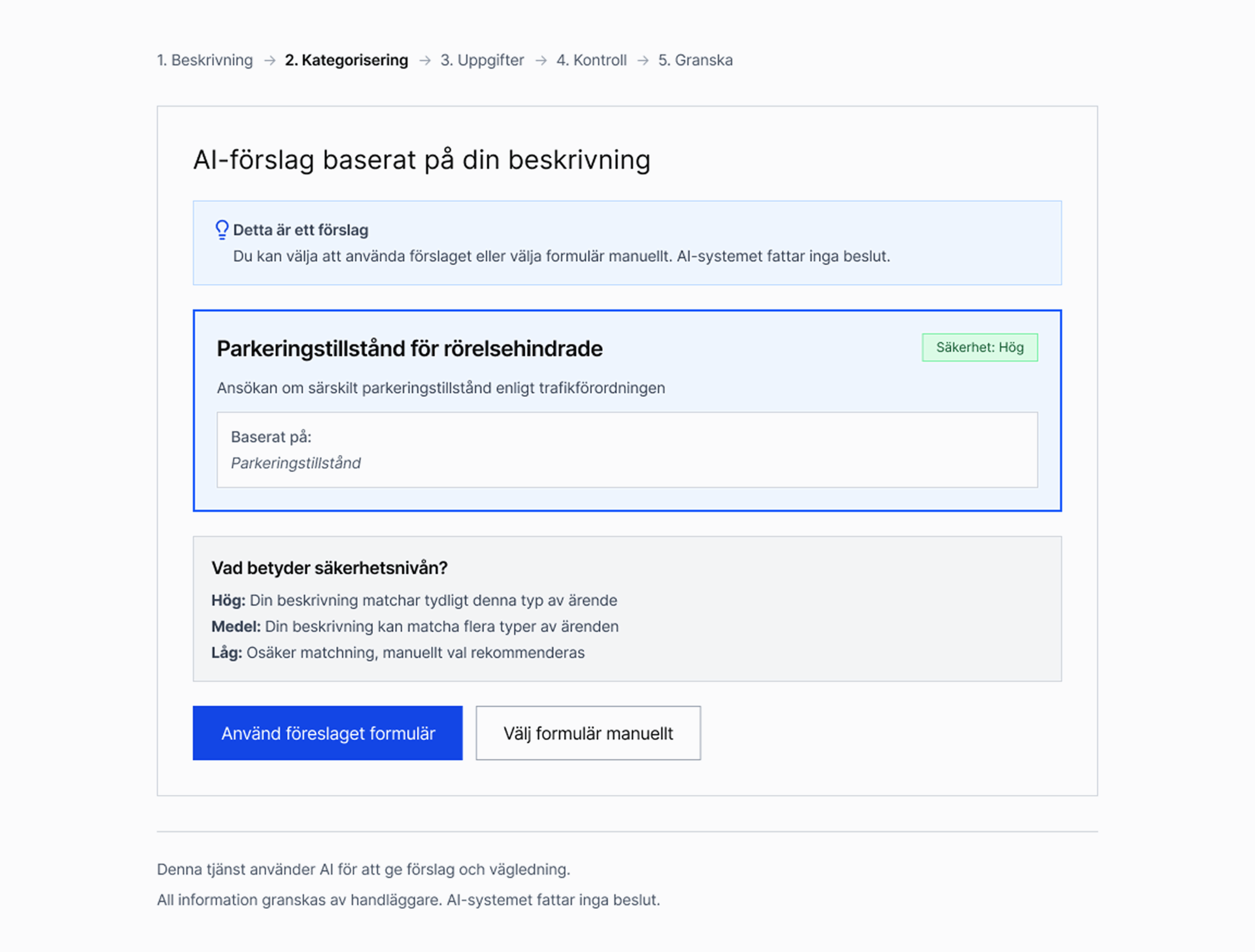
AI assistant suggests form based on context. The user can choose to manually choose a form.
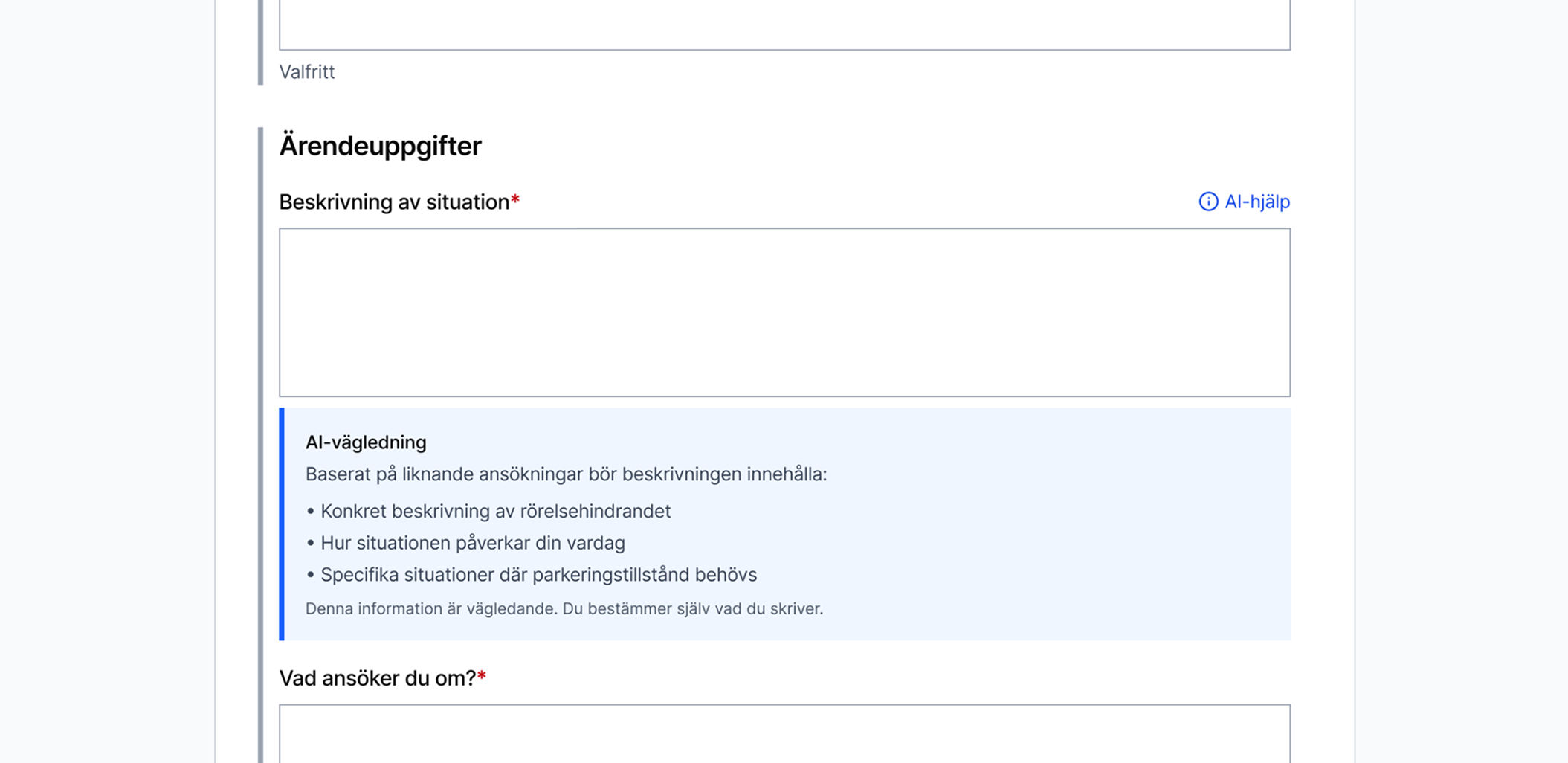
Toggle-based AI-assitance. The user can get guidance and suggestions based on input.
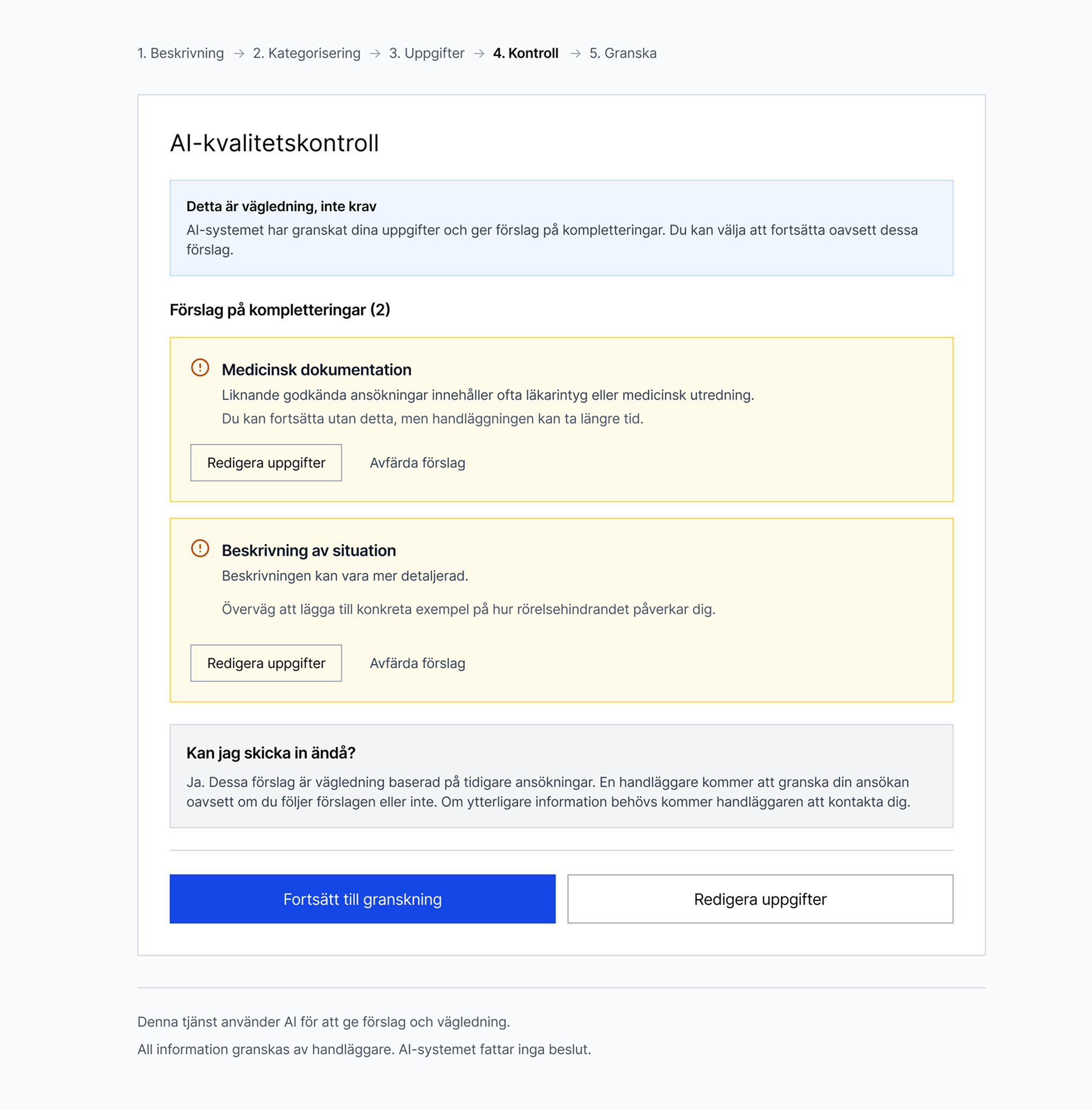
Quality check, the AI assistant provides suggestions for additions.
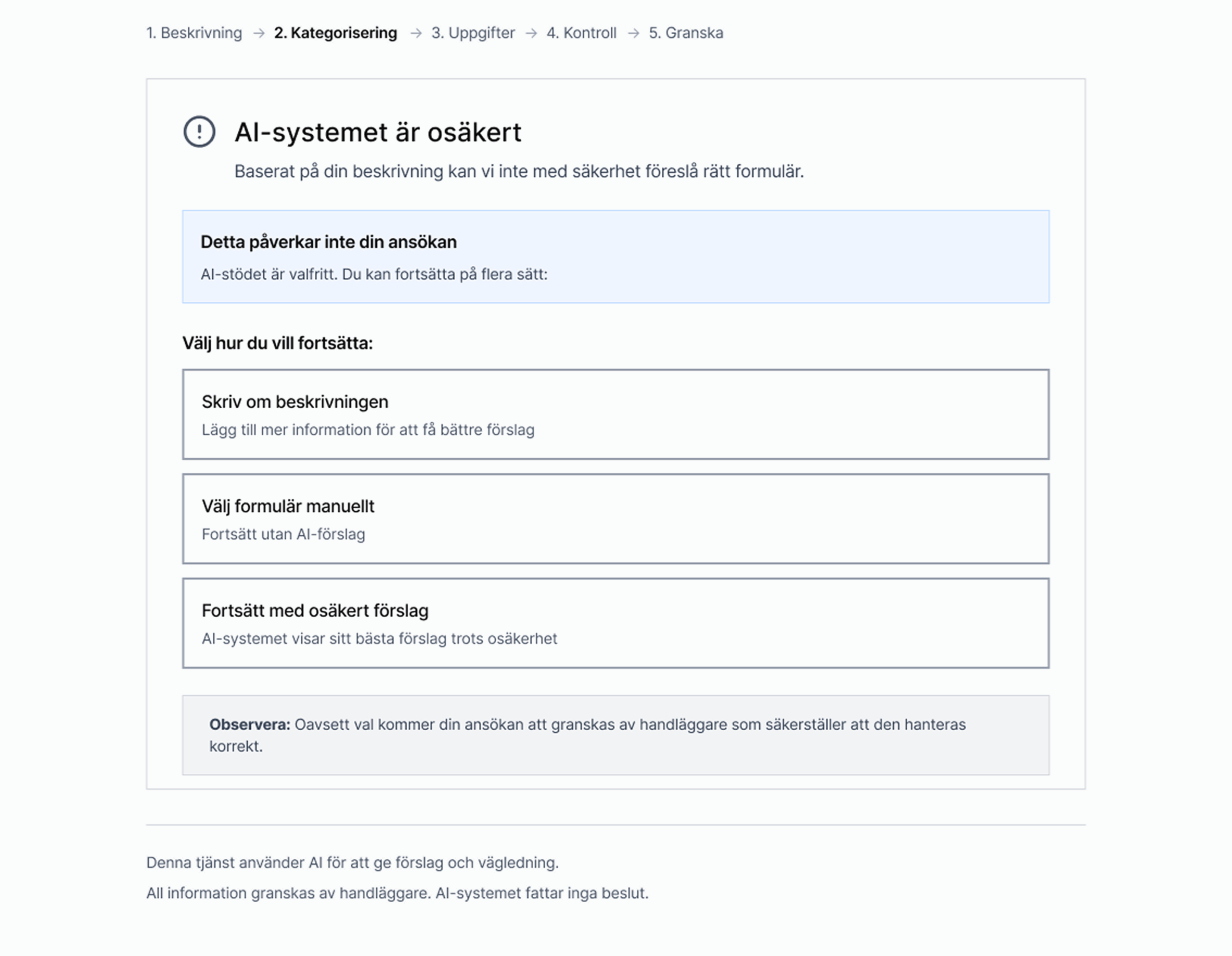
Designing for uncertainty
When AI is unsure, the system communicates this clearly and offers manual alternatives.
Key design decisions
- AI assistance should be optional, not automatic
- Users must actively request guidance
- Transparency of authority
- AI results are presented as guidance, not as recommendations
- The system makes it clear: This information is advisory, you decide what you want to write.
- Minimal visual disruption
- The AI panel is only displayed when requested.
Results
The project resulted in a concrete interaction model for how AI can be integrated into forms without replacing user control or responsibility. The solution clarifies the division of responsibility between users, AI, and systems, which reduces the risk of overconfidence and misinterpretation. The flow reduces cognitive load through progressive division and contextual AI assistance rather than generic instructions.
The solution has the potential to reduce follow-up requests by identifying ambiguities before submission.
The solution has the potential to reduce follow-up requests by identifying ambiguities before submission.
Reflection
The challenge here was to integrate an AI assistant that feels helpful, transparent, and optional. If I were to expand on this further, I would test differences in understanding with and without AI guidance. The quality of the results, the actual data from the form, how users perceive the trustworthiness of the AI assistant, and how often users actually requested AI support.